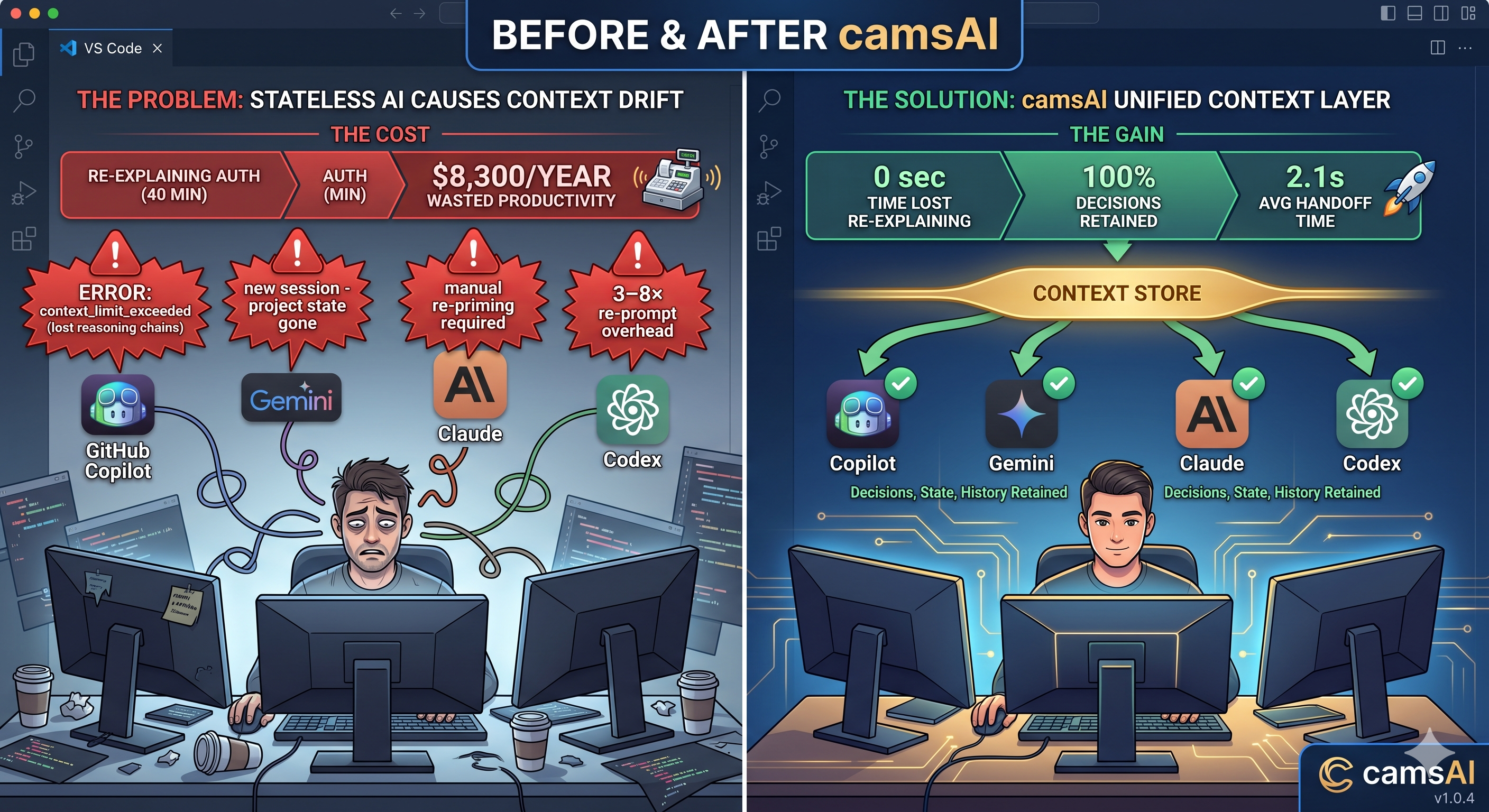
Developers re-explain context

3–8× per day. camsAI ends that.

A VS Code extension that captures, stores, and transfers your full engineering context across Copilot, Gemini, Codex, and Claude — so you never re-prime again. Context stored locally. API-assisted handoffs. Zero telemetry.

Install for VS Code — Free See how it works → code --install-extension camsAI.camsAI
Local-first architecture
MIT Licensed
Works with 4 AI tools
2.1s avg handoff
FRAGMENTED no session layer
GitHub Copilot
-94% context
↳ context_limit_exceeded — reasoning lost
Gemini Code
-99% context
↳ new session — project state gone
Claude / Codex
-77% context
↳ manual re-priming required
3–8×
re-prompt overhead
~40%
decisions re-made
0
cross-tool memory
UNIFIED camsAI active
context_store Copilot Gemini Claude Codex decisions · state · history
re-prompt overhead
100%
decisions retained
4
tools unified
01
Context limit hit
mid-session
02
Tool switching
loses history
03
Re-explaining
project every time
04
Decisions re-made
no shared memory
05
Productivity
halted on reset

AI assistants are stateless.
Your work isn't.

"I spent 40 minutes re-explaining our auth architecture to Copilot after switching to Gemini for a different task. Both had the same context — but neither knew about the other."

— Senior Eng, FinTech startup

Every time a context window fills up, your AI assistant forgets everything — the architecture decisions, the constraints, the half-finished reasoning chains. You're not building software anymore; you're babysitting attention spans.

Switch tools? Start from zero. Hit the limit? Re-explain everything. The problem isn't the model. It's the missing persistence layer.

THE COST
A senior developer earning $75/hr loses ~40 min/day to context re-priming. That's $8,300/year per developer in wasted productivity — before accounting for decision drift and rework from lost reasoning chains.
Copilot Chat — workspace
U
Continue refactoring the PaymentService — we need to handle the retry backoff we designed earlier
C
ERROR: context_limit_exceeded
I don't have context about a retry backoff design. Could you share the relevant code or explain the approach you had in mind?
U
We spent 2 hours on this...
reasoning_lost
Architecture decisions, constraint analysis, and multi-step plans vanish at context boundary.
state_gone
Project structure, in-flight tasks, and file-level understanding reset to zero.
manual_switch
Changing tools requires hand-crafting a full context re-primer. Every. Single. Time.
outcome_restart
Incomplete sessions stall. New sessions start cold. Velocity collapses at scale.

Context that travels with you.
Tool to tool, automatically.

Switch from Claude to Gemini to Copilot to Cursor. Your entire project memory — decisions, goals, constraints — follows you instantly. No copy-paste. No re-explaining. Ever.

camsAI Context Layer — active

Your context is captured once and available everywhere, instantly

Claude
Start your session
context captured
Gemini
Switch tools freely
context received
Copilot
Keep the momentum
context received
Cursor
Pick up right where you left off
context received
0 sec
time lost re-explaining your project
100%
of your decisions carried across tools
2.1s
average context transfer time

Three moments.
Seamless continuity.

STEP 01

You work, camsAI watches

Open Claude, Gemini, Copilot, or Cursor and code naturally. In the background, camsAI silently understands what matters — your goals, decisions, and project state — without interrupting you.

Claude Gemini Copilot Cursor
STEP 02

Switch tools — context transfers instantly

When you open a new AI tool or hit a context limit, camsAI automatically bridges the gap. It packages everything the new tool needs to know and hands it over — in under 3 seconds. No action required from you.

auto-transfer in progress... 2.1s
STEP 03

New tool picks up exactly where you left off

The new AI tool already knows your project goals, past decisions, current task, and anything you told the previous tool. No re-explaining. No cold starts. Full speed from second one.

"Continuing your PaymentService refactor. Applying the exponential backoff approach we agreed on..."

Everything context.
Nothing else.

Cross-model memory

Decisions made in Copilot are available in Claude. Context flows across tool boundaries automatically.

Automatic reconstruction

On context reset, camsAI rebuilds the session state in under 3 seconds. No manual re-priming needed.

Tool compatibility

Native support for all major AI coding assistants inside VS Code.

Copilot Gemini Claude Codex

Zero prompt rewriting

camsAI generates context handoff prompts automatically. You never write a re-primer again.

Background execution

Runs as a VS Code extension process. Zero impact on editor performance. Invisible until you need it.

Session stitching

Resume work from yesterday exactly where you left off. camsAI stitches sessions across time boundaries.

How camsAI stacks up.
Against every alternative.

Capability
camsAI
Manual copy-paste
Mem0 / cloud memory
Custom .cursorrules
Cross-tool context
✓ auto
manual
partial
Local-first context store
✓ local + API
✗ cloud-only
Auto context reconstruction
✓ 2.1s
slow
Session stitching (time)
Zero config required
setup
✗ manual
Decision graph (accumulates)
Anti-context (what to avoid)

Local-first storage.
API-assisted handoffs.

camsAI stores your context graph locally in your VS Code workspace. When you switch tools or hit a context limit, lightweight API calls bridge the gap — transferring only the minimal context payload needed to resume your session. No bulk code uploads. No persistent cloud storage of your codebase.

Local-first context store
Your decision graph, session history, and project state live on your machine. API calls only fire during active handoffs.
Minimal payload transfers
Handoffs send compressed context summaries — decisions, goals, constraints — not raw source code or full file contents.
Auditable by design
MIT-licensed, open-source. Your security team can inspect every line and every API call before deployment.
local + API
context stored locally, handoffs via API
No bulk code upload
Zero telemetry
Open-source (MIT)
Minimal payload only

Mid-flight context switch.
Zero turbulence.

You're deep in a refactor with Copilot. Context limit hits. Instead of losing 2 hours of reasoning, camsAI detects the failure, packages your context state, and resumes the session in Claude — in under 3 seconds. You keep coding.

Real metrics from beta users
94%
context preserved on switch
2.1s
avg rehydration time
3.2×
faster cross-tool sessions
in_flight14:22:00
Deep in PaymentService refactor with Copilot — exponential backoff logic 60% complete.
context_limit_exceeded14:29:55
Copilot: "I don't have context about the retry logic we discussed."
auto_handoff14:29:57
camsAI packaging context...
3 decisions2 anti-context2 file refstask state
resumed14:30:00 (+2.1s)
Claude: "Continuing PaymentService refactor. Implementing exponential backoff with base 200ms, max 30s ceiling, 5 retry limit before DLQ routing. Avoiding fixed delays as agreed..."

Start free.
Scale when you're ready.

Pro pays for itself in the first hour. If you save 40 min/day at $75/hr, that's $50/day recovered — for less than the cost of a coffee per week.

FREE
$0
For individual devs getting started
2 AI tools supported
7-day context history
50 events/session
Manual handoffs
Auto rehydration
Session stitching
Install Free
Sale · Free for 30 days
recommended
PRO
$9/mo
For power devs who live in AI tools
← saves ~$50/day in context overhead
All 4 tools (Copilot, Gemini, Claude, Codex)
Unlimited context history
Unlimited events/session
Auto rehydration (2.1s avg)
Session stitching
Context analytics dashboard
Start Pro — Free for 30 days
ENTERPRISE
Custom
For teams that need policy control over AI context
Everything in Pro
Team context sharing
Org-wide context policies
SSO + audit logs
API proxy / egress controls
Dedicated support SLA
Talk to us about compliance →

Your context.
Always intact.

Install camsAI in 10 seconds. Start your first persistent AI session immediately. No config required.

code --install-extension camsAI.camsAI
tweaks.panel
theme
animations